sphinx-pyrunblock

sphinx-pyrunblock is a Sphinx extension that executes code from a
runblock directive and inserts the real output into your documentation.
For example:
.. runblock:: pycon

    >>> for i in range(5):
    ...    print(i)
renders in the document as:
>>> for i in range(5):
...    print(i)
0
1
2
3
4
Contents:
Installation
$ pip install sphinx-pyrunblock
Enable the extension by adding it to the extensions list in conf.py:
extensions = [
    "sphinx_pyrunblock",
]
See Configuration for the full conf.py reference.
Worked examples
>>> from spatialmath.base import trnorm, troty
>>> from numpy import linalg
>>> T = troty(45, 'deg', t=[3, 4, 5])
>>> linalg.det(T[:3,:3]) - 1 # is a valid SO(3)
np.float64(0.0)
>>> T = T @ T @ T @ T @ T @ T @ T @ T @ T @ T @ T @ T @ T
>>> linalg.det(T[:3,:3]) - 1  # not quite a valid SE(3) anymore
np.float64(-3.3306690738754696e-16)
>>> T = trnorm(T)
>>> linalg.det(T[:3,:3]) - 1  # once more a valid SE(3)
np.float64(0.0)
>>> from spatialmath.base import qconj, qprint
>>> q = [1, 2, 3, 4]
>>> qprint(qconj(q))
Per-block options
Options are given on the directive itself, and apply to that one block only
(compare Configuration for options that apply document-wide, via
conf.py):
:linenos:Show line numbers in the rendered code block.
:include: start-endOnly render lines in the given range of the block’s output (line numbers count the block’s own statements, not the configured
runfirstcode, which never appears in output).:exclude: start-endSkip lines in the given range, same numbering as
:include:.:numpy:Prepend
import numpy as npbefore the block runs.:scipy:Prepend
import scipy as spbefore the block runs.:smtb:Append
from spatialmath import *before the block runs.:precision: NAppend
np.set_printoptions(precision=N)before the block runs. Requires numpy to already be imported (via:numpy:or a configuredrunfirst– see Configuration).
More examples
>>> getunit(90, 'deg', vector=False) # force a scalar output
np.float64(1.5707963267948966)
>>> getunit(1.5, 'rad', dim=0) # check argument is scalar
array([1.5])
>>> getunit(1.5, 'rad', dim=3) # check argument is a 3-vector
!! [RUNBLOCK-ERROR] source/index.rst:104
    ValueError: for dim==0 input must be a scalar
>>> getunit([1.5], 'rad', dim=1) # check argument is a 1-vector
array([1.5])
>>> getunit([1.5], 'rad', dim=3) # check argument is a 3-vector
!! [RUNBLOCK-ERROR] source/index.rst:104
    ValueError: incorrect vector length: expected 3, got 1
>>> getunit(90, 'deg')
array([1.5708])
For any construct with an indented body (for, while, with), it’s
important to put a blank line on the end. That will be stripped off and
won’t appear in the output.
>>> from spatialmath.base import getunit
>>> getunit(1.5, 'rad')
array([1.5])
>>> try:
...   getunit(1.5, 'rad', dim=0)
... except Exception as e:
...   print(f"EXCEPTION {e}")
array([1.5])
>>> for i in range(5):
...    print(i)
0
1
2
3
4
Lines ending with # ignore are executed but not shown in the rendered
output – useful for setup code that would otherwise clutter the example.
The REPL prompt (>>>) is actually optional, and can be omitted if you are cutting
and pasting chunks of code from elsewhere:
.. runblock:: pycon

    a = 2
    print(a**3)
will render as:
>>> a = 2
>>> print(a**3)
8
Note that indentation cannot be expressed in this mode since all white space is stripped from the start of each line. If you want to include indented code, use the REPL prompt style.
If you prefer the examples to look like a script rather than a REPL session you can
suppress the output prompts and continuation lines by using the :no-prompt: option:
.. runblock:: pycon
    :no-prompt:

    a = 2
    print(a**3)
will render as:
a = 2
print(a**3)
# → 8
Block output appears as a comment line to clearly distinguish it from the lines of input code. This means you can cut and paste the code into a Python interpreter and it will run without modification.
Other code documentation tools
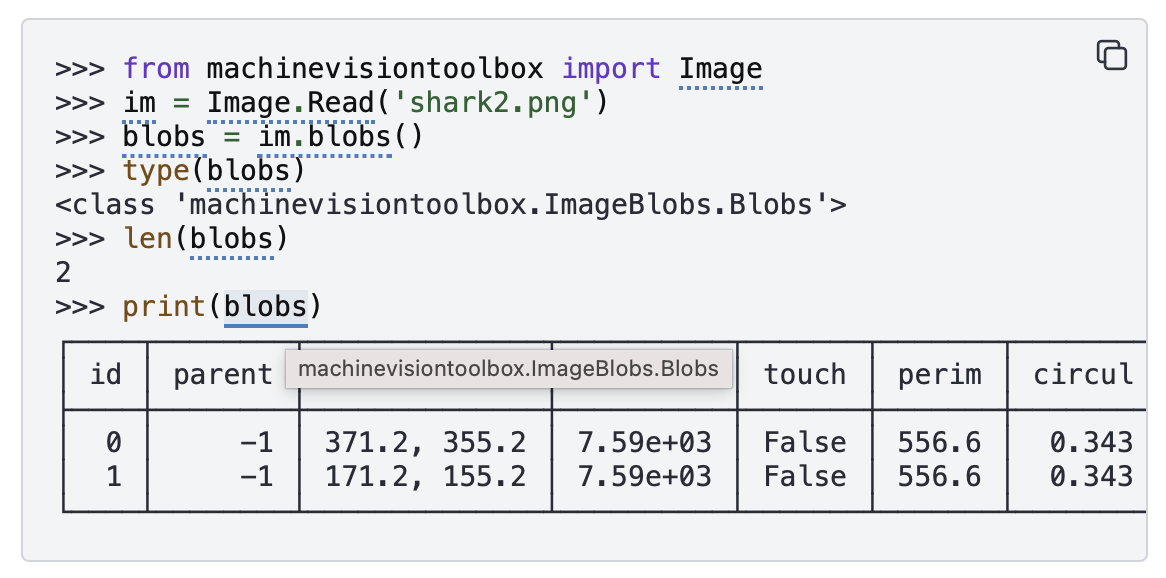
Note the copy/paste button in the top right corner of the code block, the links on the names in the code and the hoverbox showing object type. These are provided by two other Sphinx extensions.
Easy copy-paste of code
Copying text straight out of a rendered code block normally picks up the
>>> ``/… `` prompts and any output lines along with it, so pasting it
back into a file or interpreter either fails outright or pastes lines you
never wanted. The sphinx-copybutton extension adds a
copy-to-clipboard button to every code block (see above) and can be configured to strip
prompts on copy, so a reader always gets clean, runnable code regardless of
whether the block was written with prompts or :no-prompt:.
$ pip install sphinx-copybutton
extensions = [
    "sphinx_pyrunblock",
    "sphinx_copybutton",
]

# Strip >>> / ... prompts (and shell $ prompts) when the copy button is
# used; keep output lines in the copied text rather than filtering them
# out (also representative of what Peter's other toolboxes use).
copybutton_prompt_text = r">>> |\.\.\. |\$ "
copybutton_prompt_is_regexp = True
copybutton_only_copy_prompt_lines = False
copybutton_remove_prompts = True
A :no-prompt: block has no prompts for copybutton to strip in the first
place, so it’s already copy-paste-ready without any of this – the button
is mainly what makes REPL-style blocks pasteable too.
Cross-linking names to their documentation
sphinx-pyrunblock only executes code and renders output – it doesn’t
know anything about turning the names in an example into links. That’s a
separate, complementary extension:
sphinx-codeautolink. It
statically analyses each code block’s AST, tracks types through variable
assignments and chained method calls, and:
hyperlinks each resolved name to its
autodoc-generated (or intersphinx) documentation page,adds a cursor hoverbox showing the type of the variable name under the cursor.
The two extensions don’t know about each other, and don’t need to –
sphinx-codeautolink works by scanning the built HTML for code blocks
by CSS class (highlight-pycon, highlight-python, etc.), matched
against source it separately parsed from the doctree. Since runblock
sets the block’s language to pycon (or python, under
:no-prompt:), any runblock example gets cross-linked automatically
once sphinx-codeautolink is installed and enabled – no special
integration required on either side.
$ pip install sphinx-codeautolink
extensions = [
    "sphinx_pyrunblock",
    "sphinx_codeautolink",
]

from sphinx_codeautolink import clean_pycon

# "python" (used by :no-prompt: blocks) is recognised natively; pycon
# console syntax needs its prompts cleaned before the block can be
# parsed as Python, hence this entry.
codeautolink_custom_blocks = {"pycon": clean_pycon}
Require sphinx-codeautolink>=0.19.0. Earlier versions don’t resolve
Self-typed return annotations (PEP 673), which is the standard return
annotation for fluent/factory-style methods (obj = Klass.create(...))
– without the fix, cross-linking silently stops for anything chained off
a call to one of those, with no warning by default.
Error reporting
If the code raises an exception, a diagnostic marker is written to the Sphinx build log and a short error summary is embedded in the rendered output:
>>> img.metadata('FocalLength')
!! [RUNBLOCK-ERROR] machinevisiontoolbox/ImageIO.py:236
    KeyError: 'FocalLength'
The build log entry is more detailed:
!! [RUNBLOCK-ERROR] source/numpy.rst:98
    ModuleNotFoundError: No module named 'machinevisionToolbox'
    Traceback (most recent call last):
      File "<input>", line 1, in <module>
    ModuleNotFoundError: No module named 'machinevisionToolbox'
The marker line appears before the traceback so failures are easy to
scan in a long build log. The source location (file:line) refers to the
.rst file, or the Python source file containing the docstring where the
runblock directive lives.
A syntax error in the code block is reported the same way:
>>> print(("Hello, world")
!! [RUNBLOCK-ERROR] source/api.rst:42
    SyntaxError: '(' was never closed
By default the build itself still succeeds – the marker above is the
only sign anything went wrong, which means a broken example (a typo, a
missing optional dependency) can slip into published docs unnoticed. Set
pycon_fail_on_error = True (see Configuration) to turn that
into a real, CI-visible build failure instead:
autorun_languages = {}
autorun_languages["pycon_fail_on_error"] = True
sphinx.errors.SphinxError: runblock failed executing code at source/api.rst:42
The build log still has the full traceback above the SphinxError, so
the file:line in the exception message is a pointer back into your
.rst source, not the only diagnostic you get. This defaults to
False so existing docs with a runblock that’s deliberately
demonstrating an error as its expected output keep building.